The terminal UI
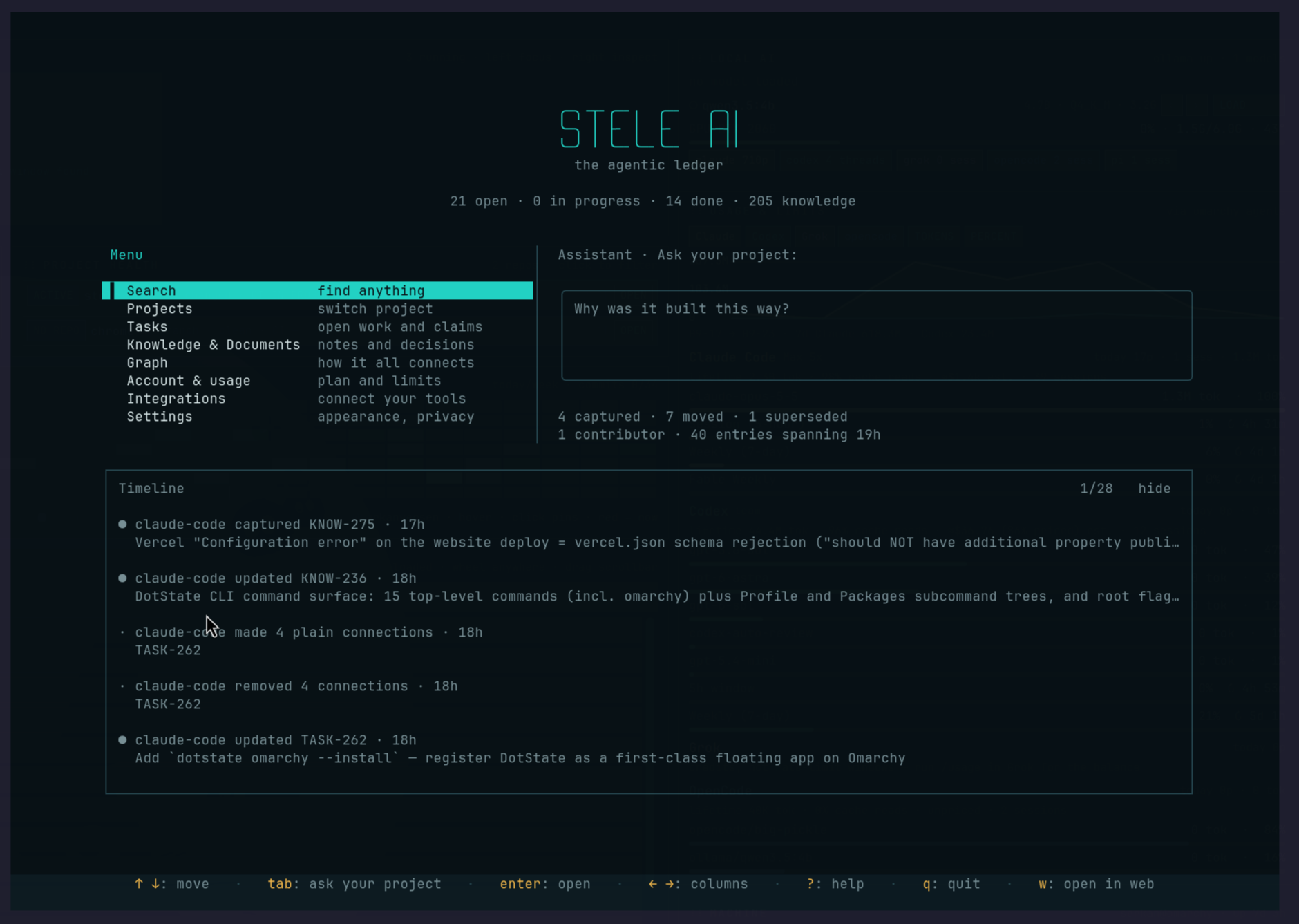
The same record the dashboard shows, without leaving the terminal. Run stele tui and you get a full-screen interface over your project: tasks, knowledge, documents, the graph, and the assistant, all keyboard-driven and updating live as your agents write.
Opening it
One command, no setup. It opens on whichever project the current directory is bound to; if nothing is bound, it opens on the project chooser instead.
It needs an interactive terminal and the installed stele binary — everything it draws with is already inside that one file, so there is nothing else to install. Press ? at any time for the full list of keys on the current screen, and q to leave.
If you aren't signed in, it offers to sign you in before it opens rather than showing you an interface with nothing behind it. Say yes and your browser opens; the interface comes up once you're back.
What's in it
Every screen is reachable by a single key from the home screen, and the footer always shows what the current screen responds to — so you can learn it by using it rather than by reading this page.
- Tasks
- The board, with the task's detail beside the list. Claim, complete, and move between tasks without switching screens.
- Knowledge & documents
- Browse what the project knows: decisions, lessons, risks, gaps, and the longer documents, rendered as formatted text rather than raw markup.
- Graph
- Three ways to look at the shape of the record in a space that can't draw a picture of it, including what's connected to what and which nodes nothing links to at all.
- Search
- The same three search modes the dashboard offers, across everything in the project.
- Assistant
- Ask your project a question and get an answer drawn from its own record, with the nodes it cited listed beside the reply so you can open any of them. Conversations are kept, so you can come back to one.
- Account, integrations, settings
- Your plan and usage, which coding agents Stele is installed into (with a way out of each), and the interface's own options.
Anything with an equivalent in the dashboard can be handed to the browser with w — a terminal is the right place to read and act, and the wrong place to show someone a link.
Staying current
The header tells you when a newer Stele has been published, and u installs it without leaving the screen. Once it's installed, the header asks you to restart — the version you are running was loaded when you opened it, so a new one only takes effect next time.
If you let Stele update itself, this is usually a note rather than a task: the update has already been fetched in the background, and the header simply tells you to restart when convenient. See Install & first run for the choice that controls it.
When to reach for it
The terminal UI and the dashboard show the same record, and neither is a reduced version of the other. Use whichever is closer to hand: the terminal UI when you're already in a terminal and want to check what a task says or what the project decided, the dashboard when you want to show someone, share a link, or work through the graph visually.
Your agents reach the same graph through the plugin, whether or not this is open. The terminal UI is for you — a place to see what they wrote and to steer what they do next.